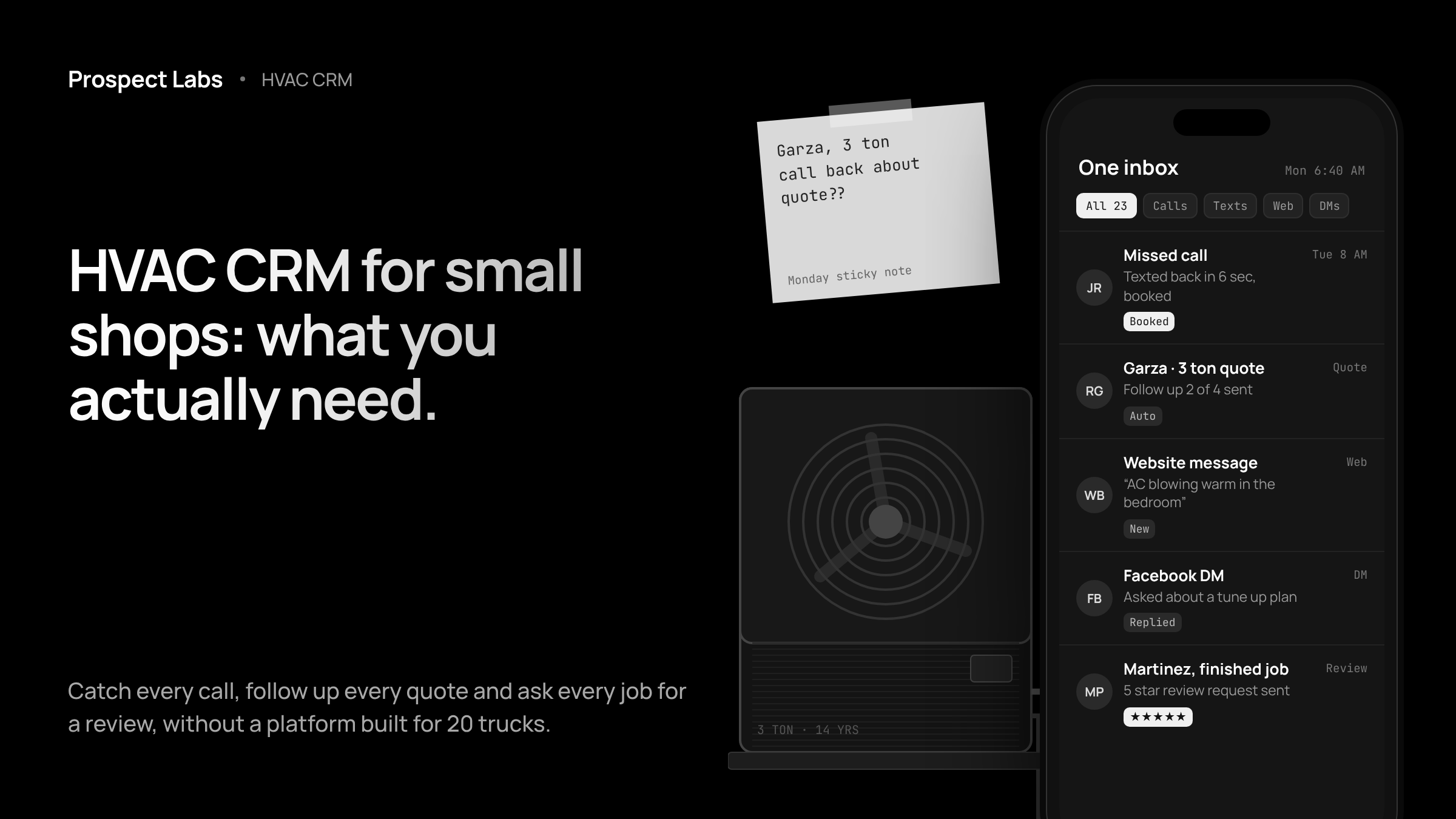

It’s 6:40 on a Monday morning in late August in San Antonio. The office whiteboard still has Friday’s jobs on it. There’s a sticky note on the monitor that says “Garza, 3 ton, call back about quote” and nobody remembers if anyone did.
Over the weekend your phone logged 23 calls. Eleven came in while you were on a rooftop unit. Three people left voicemails. The rest are just numbers sitting in your recent calls list.
Last month you sat through a demo for one of the big field service platforms. It was impressive. It also came with an onboarding fee, a price that grows with every tech you hire and a dispatch board built for a company ten times your size.
You don’t need a command center. You need a way to stop losing the customers who already called you. That’s the real job of an HVAC CRM.
Quick answer: An HVAC CRM is software that keeps every customer, lead and conversation for a heating and cooling company in one place, then automates follow up, reminders and review requests. Small shops get the most from lead capture, missed call text back and quote follow up, not dispatch boards.
Below, we cover what an HVAC CRM should do, how it differs from field service software, what the popular tools cost in 2026 and a lighter option built for shops running one to five trucks. If getting the phone to ring is your bigger problem, read our breakdown of HVAC leads first.
What Is an HVAC CRM?
An HVAC CRM (customer relationship management system) stores every homeowner, property manager and lead with their equipment, service history, quotes and messages. Its job is simple: make sure nobody who contacts your heating and cooling company falls through the cracks, from the first call to the tenth tune up.
Think of it as your company’s memory. Your techs know the work. The CRM remembers that the Garzas have a 14 year old condenser, got a replacement quote in June and haven’t heard from you since.
| Attribute | What it means for an HVAC company |
|---|---|
| Customer record | Name, address, phone, equipment age, warranty dates and service history |
| Lead tracking | Where each call, text or form came from and whether it booked |
| Communication log | Every call, text, email and social message tied to the right customer |
| Automation | Quote follow ups, maintenance reminders and review requests that send themselves |
| Reporting | Booked jobs by source, close rate and revenue per customer |
| Mobile access | Everything usable from a phone while you are in an attic or on a roof |
What’s the Difference Between an HVAC CRM and Field Service Software?
An HVAC CRM manages relationships and sales: leads, follow up, reviews and repeat business. Field service management software manages the work itself: dispatch, scheduling, routing, invoicing and inventory. Most tools sold as an “HVAC CRM” are really field service platforms with a CRM built inside.
That’s why shopping for one is so confusing. When a big platform calls itself an HVAC CRM, you’re usually buying a full operations suite. If you run 20 techs and a call center, that makes sense. If you run three trucks, you may be paying for a dispatch board you’ll never open.
| The job | Standalone CRM | Field service software | Prospect Labs system |
|---|---|---|---|
| Capture calls, texts and web leads | Yes | Partly | Yes |
| Missed call text back | Rarely | Varies by plan | Yes, built in |
| Automatic quote follow up | Yes | Varies by plan | Yes |
| Review request after every job | Sometimes | Often | Yes, with reminders |
| Dispatch and technician routing | No | Yes | No |
| Invoicing and payments | No | Yes | No |
| Website and local SEO | No | Sometimes, often extra | Yes, included |
What Should an HVAC CRM Do for a Small Shop?
For a shop with one to five trucks, an HVAC CRM needs to do six things well: capture every lead, text back missed calls, follow up on open quotes, ask for reviews, remind past customers about maintenance and keep every message in one inbox on your phone.
- Capture every lead in one place. Calls, website messages, Facebook and Instagram DMs and texts should land in one list, not five different apps.
- Text back every missed call. When you’re in a crawlspace, the caller should get a text in your business name within seconds. Here’s what really happens when you miss a call and why the text matters.
- Follow up on replacement quotes. A five figure system quote can sit for weeks while the homeowner compares three companies. Automatic follow ups keep you in the conversation without you chasing.
- Ask for reviews automatically. A one click request after every job, with polite reminders, is how small shops get more 5 star Google reviews without awkward asks.
- Remind past customers. Spring AC tune ups, fall furnace checks and maintenance agreement renewals are your cheapest jobs. The CRM should send those reminders for you.
- Work from your phone. If a tool needs a desk, a login on a laptop and a training course, your crew won’t use it.
Why Does Response Speed Matter So Much in HVAC?
Response speed matters because the first company to reply usually wins the job. A study published in Harvard Business Review found firms that contacted a lead within an hour were nearly seven times as likely to qualify it as firms that waited longer, and more than 60 times as likely as those that waited a day.
The same research found the average response time was 42 hours. In HVAC, where a homeowner with no AC calls three companies in ten minutes, 42 hours might as well be never. A good CRM shrinks that gap to seconds.
Here’s simple arithmetic on example numbers for a small shop. Swap in your own.
| Example | Number |
|---|---|
| Inbound calls a month | 50 |
| Share missed while you are on jobs | 25% |
| Missed calls a month | About 12 |
| Booking rate if answered (SearchLight HVAC benchmark) | 44% |
| Jobs lost a month | About 5 |
| Revenue at a $2,110 average ticket | About $10,550 a month |
That’s money from people who already found you. No new ad spend, no new SEO. Just a system that answers when you can’t.
What Does HVAC CRM Software Cost in 2026?
Most HVAC CRMs are sold as field service platforms, so you pay for the whole platform. Housecall Pro lists plans at $79, $189 and $329 a month on monthly billing. ServiceTitan quotes by company size. The cost that surprises owners most is extra users and add ons once you start hiring.
| Tool | Pricing model | Published price | Users included | Best fit |
|---|---|---|---|---|
| Housecall Pro Basic | Monthly plan | $79/mo monthly or $59/mo annual | 1 | Owner operator |
| Housecall Pro Essentials | Monthly plan | $189/mo monthly or $149/mo annual | Up to 5 | Small teams |
| Housecall Pro MAX | Monthly plan | $329/mo monthly or $299/mo annual, extra users $35/mo | Up to 8 | Growing teams |
| Jobber | Tiered plans | Extra users $29 per user per month | Varies by plan | Small teams that need scheduling and invoicing |
| ServiceTitan | Custom quote | Not listed publicly | Priced per company | Established multi crew HVAC companies |
| FieldEdge | Custom quote | Contact vendor | Priced per company | Shops built around maintenance agreements |
| Prospect Labs | Flat monthly, month to month | From $297/mo plus one time setup | Your phone plus a business line | 1 to 5 truck shops focused on lead capture |
Sources: Housecall Pro, ERP Research, Quo, ServiceTitan, Prospect Labs pricing. Prices change often, so check each vendor’s page before you sign.
Team size moves the bill more than anything else. For a five person team, Housecall Pro Essentials at $189 a month versus Jobber’s Grow tier at $299 works out to about $1,320 a year in difference, according to a 2026 pricing comparison, and that’s before card processing fees.
Which HVAC CRM Fits Your Shop Size?
The right HVAC CRM depends on your biggest bottleneck. Owner operators lose jobs to missed calls. Small crews lose them to quotes that go cold. Larger shops lose them to dispatch chaos. Buy the tool that fixes the problem you have today, not the one you might have in five years.
| Shop size | Main bottleneck | What to prioritize | Typical fit |
|---|---|---|---|
| Owner operator, 1 truck | Missed calls while working | Missed call text back, one inbox, reviews | A lightweight system like Prospect Labs, or a basic field service plan |
| 2 to 5 trucks | Quotes going cold, no follow up | Automatic follow up, review funnel, maintenance reminders | Prospect Labs plus simple invoicing, or a mid tier platform |
| 6 to 15 trucks | Scheduling and dispatch chaos | Dispatch board, routing, service agreements | Housecall Pro, Jobber or FieldEdge |
| 15+ trucks, several locations | Reporting, call center, inventory | Full platform with call booking and pricebook | ServiceTitan or similar |
Why Is Prospect Labs a Lighter HVAC CRM for Small Shops?
Prospect Labs works as a lighter HVAC CRM because it focuses on the part of the job small shops lose most: answering, following up and getting reviewed. It bundles a website, missed call text back, automatic follow up, a review funnel, campaigns, one inbox and a business line for $297 a month, month to month.
Everything runs from your phone. Messages arrive as texts. Review requests go out in one click. Campaigns switch on with one button. We set it up in 7 to 10 days and walk you through it on a 25 minute launch call.
- Functional website built mobile first, with one tap texting. See how we approach HVAC website design.
- Missed call text back in your business name, every time.
- Automated lead follow up so replacement quotes don’t go cold.
- 5 star review funnel with reminders until the customer follows through.
- One click [referral and return customer campaigns](https://prospectlabs.co/referral-marketing-for-contractors/) for tune up season.
- All in one inbox for texts, web messages, Facebook and Instagram.
- Business phone line so work calls are tracked and never mixed with personal ones.
- Local SEO with ongoing updates so your site keeps earning its place on Google.
To be straight with you: it isn’t a dispatch board or an invoicing tool. If you run 15 trucks and a call center, you need full field service software, and our guide to Jobber alternatives compares those options. Many small shops pair our marketing system for contractors with QuickBooks or a basic scheduling app and find that’s all they need.
What Are the Most Common HVAC CRM Mistakes?
The most common HVAC CRM mistakes are buying the biggest platform first, leaving leads in a phone’s call log, relying on memory for follow up, never asking for reviews and locking into a long contract before the tool has proven itself.
| Mistake | What it costs you | The fix |
|---|---|---|
| Buying the biggest platform first | Paying for seats and features you never use | Match the tool to your truck count |
| Leads living in your call log | No record and no follow up | One inbox that logs every call and text |
| No missed call text back | Callers dial the next company | Automatic text in your business name |
| Follow up depends on memory | Replacement quotes go cold | An automatic sequence after every quote |
| Never asking for reviews | Lower map pack and LSA rankings | A review request after every job |
| Ignoring past customers | Your cheapest jobs go unbooked | Seasonal tune up and referral campaigns |
| Signing a long contract too early | Stuck with a bad fit | Start month to month, commit once it pays |
How Do You Set Up an HVAC CRM Without Losing a Week?
Set up an HVAC CRM in this order: list every lead source, put them on one number and one inbox, switch on missed call text back, write your quote follow ups, import past customers, turn on review requests and check booked jobs by source each month.
- List every way customers reach you today: phone, website form, Google Business Profile, Facebook, referrals.
- Route them all to one business number and one inbox.
- Turn on missed call text back before anything else. It pays back fastest.
- Write three short follow up texts for open replacement quotes.
- Import past customers and schedule a seasonal tune up reminder.
- Switch on review requests for every finished job.
- Once a month, check booked jobs by source and cut what isn’t working.
With Prospect Labs, steps two through six are done for you after one onboarding form.
Ready to Stop Losing HVAC Customers You Already Earned?
A CRM won’t fix a compressor. It fixes what happens after the phone rings, and for most small HVAC shops that’s where the money leaks out.
We build website design and marketing systems for contractors at a flat monthly price, month to month, with no long term contract. You can see real builds on our work page, and if you’re comparing providers, our guide to choosing a contractor marketing agency lists the questions worth asking.
Book a strategy call and we’ll look at how calls, quotes and reviews are handled in your shop today. If we’re not the right fit, we’ll tell you straight.
FAQs
What is the best HVAC CRM for a small business?
For a shop with one to five trucks, the best HVAC CRM is the one that captures every lead and follows up automatically. Housecall Pro and Jobber suit small teams that need scheduling and invoicing. Prospect Labs suits shops that mainly need missed call text back, follow up and reviews.
How much does an HVAC CRM cost?
Housecall Pro lists plans at $79, $189 and $329 a month on monthly billing, with lower annual rates. ServiceTitan and FieldEdge quote by company size. Prospect Labs starts at $297 a month plus a one time setup fee, month to month.
Is ServiceTitan a CRM?
ServiceTitan is a field service management platform with CRM features built in. It covers dispatch, pricebook, call booking and reporting, which makes it a strong fit for established HVAC companies and often more than a small shop needs.
Do I need a CRM if I already use field service software?
Not always. Many field service tools include basic CRM features. Check whether yours texts back missed calls, follows up on quotes automatically and requests reviews. If it doesn’t, add a lead capture and follow up layer rather than switching platforms.
Can an HVAC CRM text back missed calls?
Some can, depending on the plan. Prospect Labs includes missed call text back on every account, so a caller gets a text in your business name within seconds while you finish the job you’re on.
How long does it take to set up an HVAC CRM?
Simple systems can be live in days. Full field service platforms often take weeks of onboarding and data import. Prospect Labs is built and live in 7 to 10 days after one onboarding form and a short launch call.