
Your software bill landed in your inbox again this morning, and it’s bigger than last month. When you signed up for Jobber, it was one plan for one person. Now there’s a seat for every tech you’ve hired, a charge for review requests, another for marketing texts, and a processing fee on every card payment. The app still works fine. You’re just starting to wonder if you’re paying for the right thing.
That’s how most contractors end up searching for Jobber alternatives. Jobber isn’t bad software. It’s one of the most popular field service platforms in the country. But it was built for a certain size and type of business, and a lot of shops grow past it.
This guide compares 11 alternatives with real 2026 pricing, explains who each one fits, and covers the one problem that switching software alone won’t solve.
Quick answer: The best Jobber alternatives in 2026 are Housecall Pro, Workiz, ServiceTitan, FieldPulse, Service Fusion, ServiceM8, QuoteIQ, GorillaDesk, JobNimbus, Contractor Foreman and Joist. The right pick depends on your trade, crew size and whether you pay per user or flat rate.
What Is Jobber and Who Is It Built For?
Jobber is field service management (FSM) software that helps home service businesses quote, schedule, dispatch, invoice and collect payment from one app. It’s built mainly for small residential service crews: lawn care, cleaning, HVAC, plumbing, electrical and handyman businesses with roughly 1 to 15 people.
Jobber is a Canadian company founded in 2010, and it covers the daily operations side of a service business well. Your office sees today’s schedule, open quotes and unpaid invoices in one dashboard, while techs update jobs from the mobile app.
Here’s what Jobber lists on its pricing page as of fall 2026:
| Jobber plan | Monthly billing | Annual billing (per month) | Users included |
|---|---|---|---|
| Core | $49 | $29 | 1 |
| Connect | $139 | $99 | 1 |
| Grow | $199 | $149 | 1 |
| Plus | $499 | $399 | 5 |
Every additional user costs $29 per month on any plan. There’s a free trial, but no free plan.
Why Do Contractors Look for Jobber Alternatives?
Most contractors leave Jobber because costs climb as the team grows, key tools sit behind add-ons, and the software doesn’t fit project-based trades like roofing or remodeling. Dispatch limits and reporting depth push larger service shops out too.
Here’s what usually triggers the search:
Per user pricing stacks up fast. A five person crew on the Grow plan pays the base price plus $29 for each extra seat. At 10 or 15 people, flat rate platforms often come out cheaper.
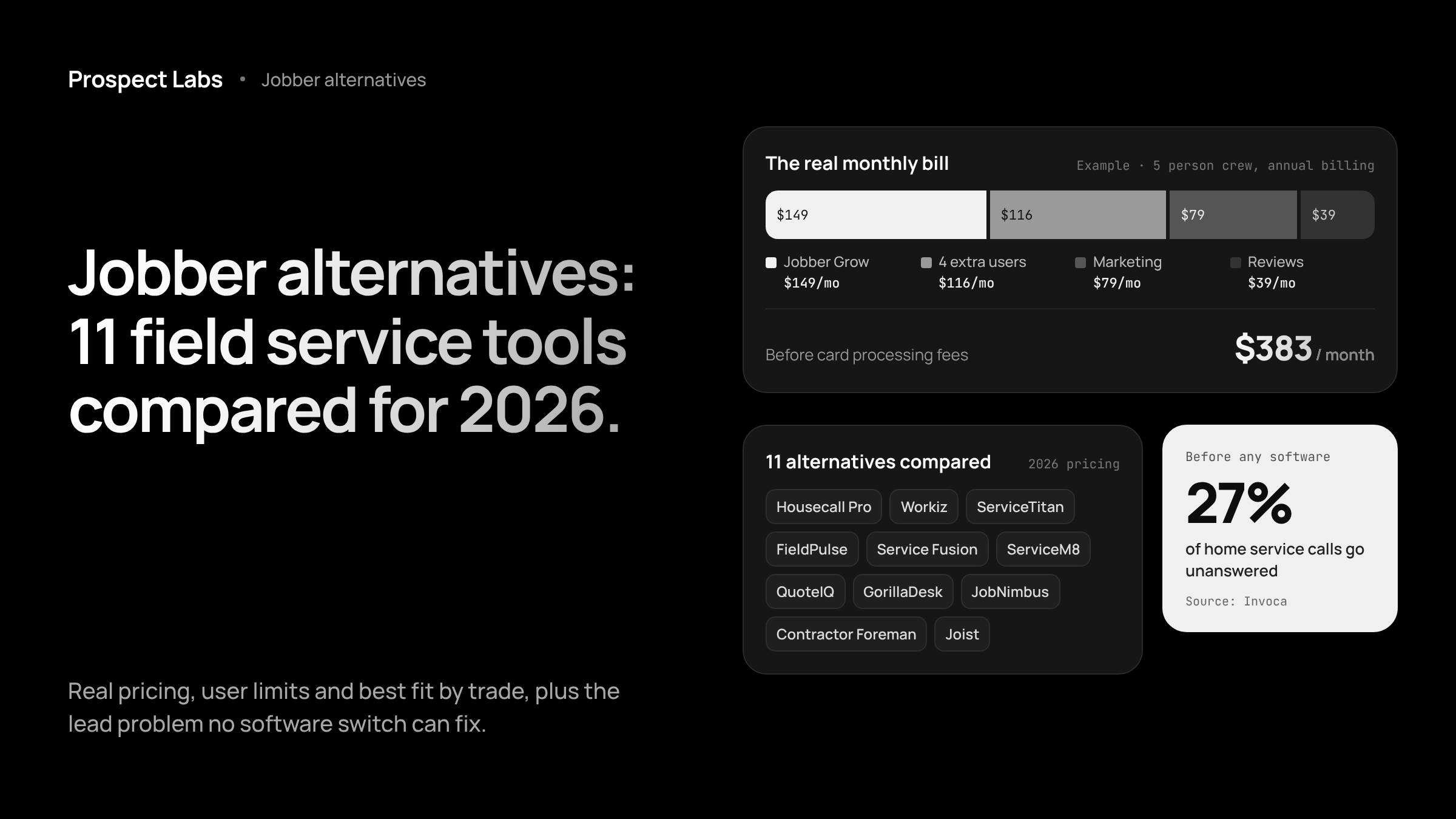
Add-ons inflate the real bill. The sticker price isn’t the whole story. Jobber sells several features separately:
| Jobber add-on | Approximate monthly cost |
|---|---|
| Marketing Suite | $79 |
| Reviews | $39 |
| Sales add-on | $49 |
| AI Receptionist | Paid add-on (price varies by plan) |
| Card processing | About 2.9% + $0.30 per transaction |
A Grow plan with marketing and reviews added can pass $300 a month before you hire anyone.
Dispatch is manual. Jobber’s scheduler is drag and drop. There’s no skill based assignment or route optimization, which starts to hurt around 10 or more techs.
Project work doesn’t fit. Roofers, remodelers and general contractors run multi week jobs with insurance claims, change orders and material orders. Jobber was built for service calls, not projects.
Reporting stays basic. Shops that want marketing attribution, technician performance or customer lifetime value data usually need something heavier.
What Should You Look for in a Jobber Alternative?
Look at five things: pricing model (per user, flat rate or job caps), trade fit, dispatch depth, accounting sync, and what’s included versus sold as an add-on. A tool that matches your trade and crew size beats one with the longest feature list.
Before you book demos, answer these questions:
- How many people need a login? Five or fewer usually favors tiered plans. Ten or more usually favors flat rate or unlimited users.
- Do you run service calls or projects? A drain cleaning and a full roof replacement need different software.
- What phones does your crew carry? Some platforms work best on iPhone only.
- Which accounting software do you use? QuickBooks Online, QuickBooks Desktop and Xero support varies a lot.
- What does the full bill look like? Ask every vendor for base price, user fees, payment processing rates and add-ons in writing.
What Are the Best Jobber Alternatives in 2026?
These 11 platforms cover the main reasons contractors leave Jobber. Prices reflect what each vendor or verified review sites listed in 2026. Software pricing changes often, so confirm on the vendor’s site before you sign.
1. Housecall Pro
Best for: iPhone heavy service crews selling higher ticket jobs
Housecall Pro is the closest swap for most Jobber users. It targets the same HVAC, plumbing and electrical shops with 2 to 15 people. Basic starts at $59 per month on annual billing ($79 monthly) for one user. Essentials runs $149 annually for up to five users, and MAX costs $299 for up to eight, then $75 per extra user.
Where it beats Jobber: fast payouts (card payments in your bank within about 30 minutes for an extra fee) and customer financing built into estimates, which helps close bigger jobs.
Where it falls short: the Android app gets weaker reviews, and add-ons can push the monthly bill well past the starting price.
2. Workiz
Best for: HVAC, plumbing, electrical, garage door and appliance repair shops with 3 to 25 techs
Workiz moved to sales quoted pricing in 2026. The last published plans started around $225 per month for three users. It offers a 7 day trial with no credit card.
Where it beats Jobber: a real dispatch board that filters by technician skill and live GPS location, plus a built in phone system and an AI answering option.
Where it falls short: you can’t see pricing without a sales call, and the AI answering tool is sold separately.
3. ServiceTitan
Best for: larger shops with 20+ techs and multiple service lines
ServiceTitan is the enterprise option in residential field service. Pricing is custom quoted, and onboarding typically takes months rather than days.
Where it beats Jobber: deep reporting, marketing attribution, pricebook management, membership programs and call booking tools built for high volume contact centers.
Where it falls short: cost and complexity. For a five person crew, it’s usually too much software.
4. FieldPulse
Best for: multi trade shops running HVAC, plumbing and electrical under one roof
FieldPulse doesn’t publish prices. Third party estimates land between $65 and $115 per user per month, and there’s no free trial, only a demo.
Where it beats Jobber: accounting sync covers QuickBooks Online, QuickBooks Desktop, Xero and MYOB. Guided job workflows keep every tech running jobs the same way.
Where it falls short: per user pricing gets expensive for big teams, and you commit before you can test it yourself.
5. Service Fusion
Best for: growing service shops that want unlimited users at a flat price
Service Fusion includes unlimited users on every plan. Starter costs $245 per month ($208 on annual billing), Plus costs $382 ($325 annually), and Pro costs $627 ($533 annually).
Where it beats Jobber: team size never changes your bill. A 15 person shop pays the same as a 5 person shop on the same plan. It also syncs with both QuickBooks Online and Desktop.
Where it falls short: no free trial, and job costing plus inventory require the Plus plan.
6. ServiceM8
Best for: solo operators and iPhone only crews under 20 staff
ServiceM8 has a permanent free plan covering 30 jobs per month. Paid plans run $29, $79, $149 and $349 per month, all with unlimited users. Instead of charging per seat, it caps monthly job volume.
Where it beats Jobber: no seat math at all, Tap to Pay on iPhone with no card reader, and strong accounting integrations.
Where it falls short: the full app runs on iPhone, iPad and Mac only. Android users get a limited version.
7. QuoteIQ
Best for: pressure washing, lawn care, cleaning and exterior services, or any crew past 10 seats
QuoteIQ uses flat rate tiers from $29.99 to $699 per month. The top Max plan includes unlimited users.
Where it beats Jobber: AI tools and a virtual call answering team come on every plan. Satellite measuring pulls lawn, driveway and roof square footage into estimates.
Where it falls short: QuickBooks Online only, fewer integrations, and lighter dispatch tools for HVAC and plumbing service calls.
8. GorillaDesk
Best for: pest control, lawn care and pool service routes
GorillaDesk prices by route instead of by user. Basic is $49 per month, Pro is $99 and Growth is $149, with a 14 day free trial.
Where it beats Jobber: recurring route scheduling, route optimization and pest specific workflows at a low entry price.
Where it falls short: texting and phone service cost extra, and it’s built narrowly for route based trades.
9. JobNimbus
Best for: roofing, siding and restoration contractors
JobNimbus starts around $225 per month on a quote basis, then charges per user by role. A five person team typically lands around $600 to $700 per month.
Where it beats Jobber: a job board built around the roofing pipeline, aerial measurement and supplier integrations, and insurance claim tracking. If you’re working on your roofing marketing, this is the CRM most roofers pair it with.
Where it falls short: it costs several times more than Jobber for a small crew and isn’t built for service call trades.
10. Contractor Foreman
Best for: remodelers, general contractors and custom home builders
Contractor Foreman lists published pricing from $49 per month up to $332 per month for unlimited users on annual billing. It includes a 30 day trial.
Where it beats Jobber: real project management, including change orders, RFIs, progress invoicing, purchase orders, daily logs and a client portal.
Where it falls short: scheduling isn’t built for daily dispatch, and there’s no month to month option.
11. Joist
Best for: solo contractors and handymen who mainly need estimates and invoices
Joist has a free tier, and its paid plan starts around $14 per month. It’s a phone first tool, not a full FSM platform.
Where it beats Jobber: price and simplicity. You can send a professional estimate from the driveway in minutes.
Where it falls short: no real scheduling, dispatch or team management. You’ll outgrow it once you hire.
How Do Jobber Alternatives Compare on Price?
Jobber alternatives range from free (ServiceM8, Joist) to custom enterprise contracts (ServiceTitan). Flat rate platforms like Service Fusion and QuoteIQ Max usually win for crews of 10 or more, while tiered tools win for small teams.
| Software | Starting price | Pricing model | Free trial | Best fit |
|---|---|---|---|---|
| Jobber | $29 annual / $49 monthly | Tiered + $29 per extra user | Yes | Small service crews |
| Housecall Pro | $59 annual / $79 monthly | Tiered + $75 per user past 8 | 14 days | Service crews, big tickets |
| Workiz | Sales quoted (last listed $225) | Base + per user | 7 days | HVAC, plumbing, electrical |
| ServiceTitan | Custom quote | Custom | Demo only | 20+ techs |
| FieldPulse | About $65 per user | Per user, quoted | Demo only | Multi trade shops |
| Service Fusion | $208 annual / $245 monthly | Flat, unlimited users | Demo only | Growing teams |
| ServiceM8 | Free / $29 | Job caps, unlimited users | 14 days | iPhone crews |
| QuoteIQ | $29.99 | Flat tiers, unlimited on Max | 14 days | Exterior trades |
| GorillaDesk | $49 | Per route | 14 days | Pest, lawn, pool |
| JobNimbus | About $225 | Base + per role user | 14 days | Roofing, restoration |
| Contractor Foreman | $49 annual | Flat tiers, unlimited at $332 | 30 days | Remodelers, GCs |
| Joist | Free / about $14 | Per user | Free tier | Solo estimates |
Which Jobber Alternative Fits Your Trade?
Match the software to the type of work you do. Service call trades need strong dispatch, project trades need pipeline and change order tools, and route based trades need recurring scheduling.
| Your trade | Strongest options |
|---|---|
| HVAC, plumbing, electrical | Workiz, Housecall Pro, FieldPulse, ServiceTitan |
| Roofing, siding, restoration | JobNimbus |
| Remodeling, general contracting, home building | Contractor Foreman |
| Lawn care, pressure washing, cleaning | QuoteIQ, ServiceM8 |
| Pest control, pool service | GorillaDesk |
| Tree service, landscaping, hardscaping | QuoteIQ, Housecall Pro |
| Solo handyman | Joist, ServiceM8 Free |
Will Switching Software Fix Lost Leads?
No. Field service software manages jobs after a customer says yes. It doesn’t get you found on Google, answer the call you missed while you were up a ladder, or follow up with the homeowner who went quiet. Those leaks happen before any software sees the job.
This is the part most comparison articles skip, because most of them are written by software companies.
Call tracking data from Invoca shows that about 27% of calls to home service businesses go unanswered. An older industry study found something even more telling: home service pros answered about 66% of incoming calls, while believing they answered 97%.
Think about what that means. A homeowner with a leaking water heater calls you, gets no answer, and calls the next name on Google. That job never enters Jobber, Housecall Pro or ServiceTitan. No scheduling software can recover a lead it never received.
The fix sits in front of the software:
- A website built to convert. Your contractor website should give visitors a one tap way to text or call, not just a phone number in the footer.
- Missed call text back. An automatic text in your business name the moment a call rings out keeps the homeowner from calling a competitor.
- Automated follow up. Quotes and enquiries that go quiet need a nudge, which is how plumbers get more plumbing leads from the traffic they already have.
- Review requests after every job. More five star reviews lift your Google Business Profile, which brings in more calls.
Trade specific playbooks help here too. Roofers can start with roofing website design, remodelers with remodeling marketing, and tree crews with tree service marketing.
The best setup for most contractors is simple: a field service tool that fits your trade for operations, plus a marketing system that makes sure the jobs actually reach it.
How Do You Switch From Jobber Without Losing Data?
Export your clients, job history and invoices from Jobber, test the new platform during its trial, run both systems side by side for about two weeks, then cancel Jobber only after your first invoices are paid through the new tool.
- Check your contract. Monthly billing has no lock in. If you paid annually, start your trial about a month before renewal.
- Export your data. Client lists, job history and invoice records come out of Jobber. Automations, quote templates and custom forms usually need to be rebuilt.
- Lean on your accounting software. If you synced QuickBooks, your financial history is already safe there.
- Test during a slow week. Don’t migrate in the middle of peak season.
- Let your techs vote. The app your crew will actually use beats the app with more features.
- Cancel last. Keep Jobber until a full week runs smoothly on the new system.
Frequently Asked Questions
What is the best alternative to Jobber?
For most HVAC, plumbing and electrical shops, Housecall Pro is the closest like for like swap, and Workiz is stronger if dispatch is your main problem. Roofers should look at JobNimbus, and remodelers at Contractor Foreman.
Is there a free alternative to Jobber?
Yes. ServiceM8 offers a free plan covering 30 jobs per month for one user, and Joist has a free tier for estimates and invoices. Jobber itself has no free plan, only a trial.
What is cheaper than Jobber for a large crew?
Platforms with unlimited users usually win past 10 seats. Service Fusion starts at $208 per month on annual billing with unlimited users, and QuoteIQ Max costs $699 per month with no seat limit.
Is Housecall Pro better than Jobber?
It depends on your crew. Housecall Pro wins on fast payouts and customer financing, while Jobber has the better rated Android app and a cheaper entry plan. Many contractors find the two roughly equal on core scheduling and invoicing.
Can I move my data from Jobber to another platform?
Yes. Jobber exports clients, job history and invoices. Automations, templates and custom fields don’t transfer cleanly, so plan time to rebuild them.
Does field service software help me get more leads?
Not on its own. FSM software manages work after a customer books. Getting found on Google, answering missed calls and following up with leads require a website and marketing system working in front of it.
Get More Jobs Into Whatever Software You Choose
Prospect Labs builds websites and marketing systems for roofing, HVAC, plumbing, remodeling and 20+ other trades. Every build includes local SEO, missed call text back, automated follow up and a five star review funnel, so more homeowners actually reach your schedule. It’s month to month, starting at $297 per month. You can see real client builds or book a strategy call for a free design preview.